






Content Preview
- How to Download and Set up WeChat on Your Phone
- How to Use WeChat Pay in China (Foreigner Setup Guide)
- How to Add Contacts and Connect with People on WeChat
- Other Features of WeChat: More Than Contact & Making Payments
- Frequently Asked Questions (FAQs) about WeChat in China
How to Download and Set up WeChat on Your Phone
Where to Download WeChat Safely
For iOS (iPhone), search for “WeChat” in the Apple App Store. For Android, download it from Google Play Store or your device’s built-in application store.
If you want to install it on your computer, visit the official website of WeChat International to download the Windows or Mac client. Note that logging into the desktop version requires scanning a QR code with your mobile app, making it an auxiliary tool.


How to Register a WeChat Account Step-by-Step
You do not need a Chinese SIM card to register—an overseas international phone number works completely fine.
- Step 1: Open WeChat and tap “Sign Up” → “Sign up via Mobile”. (While Apple or Facebook login options exist, mobile registration is smoother).
- Step 2: Enter your Name, Region, International Phone Number, and a secure Password. Agree to the Terms of Service and tap “Continue”.
- Step 3: Tap “Start” at the bottom to complete the security verification (drag the puzzle piece into place).
- Step 4: Verify your mobile number via SMS verification code and submit.
- Step 5: Verify your email address by clicking the confirmation link sent to your inbox.
- Step 6 (Security Verification): Some new accounts require an existing WeChat user to scan an on-screen QR code for security verification. Tip: Have a friend who uses WeChat ready, as the QR code expires in 10 minutes.
- Step 7: Select the services you wish to enable and tap “Done”. Your account is now active!
How to Use WeChat Pay in China (Foreigner Setup Guide)
WeChat Pay (微信支付) is the backbone of daily life and payment in China. Since its launch, it has transformed China into an almost completely cashless society. Whether you are paying at high-end shopping malls, local street markets, restaurants, metros, buses, taxis, or scenic spot ticket booths, WeChat Pay is accepted everywhere.
How to Set up WeChat Pay for Foreign Tourists
Setting up WeChat Pay with an international credit card takes just a few minutes. Major global cards including Visa, Mastercard, American Express, Discover, JCB, and Diners Club are all fully supported.
Pro Tip: Complete your real-name verification before arriving in China so your card is ready to use immediately upon landing.
- Step 1 (Enable Service): Tap “Me” → “Services” (or “Pay and Services”) → “Wallet”. (If you don’t see Wallet, go to “Me” → “Settings” → “General” → “Tools” → “Weixin Pay” and tap “Enable” first).
- Step 2 (Add Card): Inside the Wallet, tap “Bank Cards” → “Add a Bank Card”.
- Step 3 (Identity Verification): Accept the Service Agreement and fill in your passport details (Name, Gender, Nationality, Passport Number, and Expiration Date).
- Step 4 (Upload Passport Copy): Take a clear photo of your passport information page to complete real-name authentication.
- Step 5 (Enter Card Info): Input your international credit/debit card number, expiration date, and CVV code. Once verified, your card is successfully linked!


How to Pay for Things in China Using WeChat
Once your card is linked, paying for goods, transportation, and meals is effortless. There are two primary ways to pay offline:
Other Useful Payment Features:
- In-App Purchases: When booking train tickets or hotels on other China travel apps, select “WeChat Pay” at checkout for instant seamless payment.
- Sending Red Packets (Hongbao): Want to send a gift or split a bill with a friend? Inside any 1-on-1 chat, tap the “+” icon at the bottom right → select “Red Packet” → enter the amount (up to 200 CNY) and send.
How to Add Contacts and Connect with People on WeChat
WeChat is the main communication app in China. Whether you need to stay in touch with your tour guide, local friends, or travel companions, adding contacts is simple and versatile.
3 Easy Ways to Add Contacts on WeChat
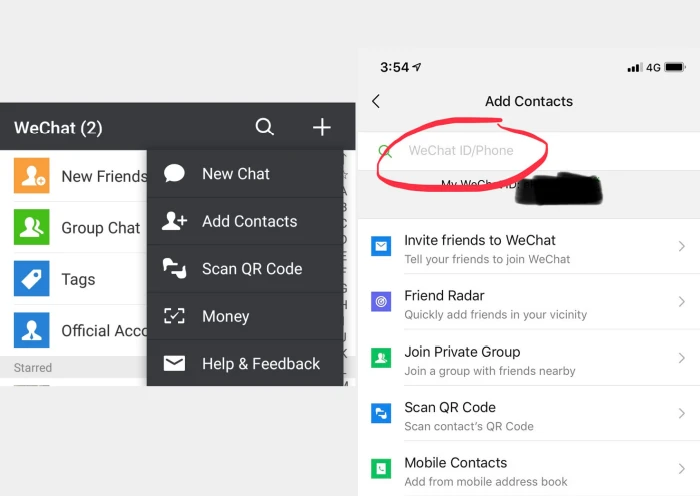
- Adding Chinese & International Phone Numbers: Tap the “+” icon at the top right → select “Add Contacts”. Type the user’s WeChat ID or phone number in the search bar.
Note for International Numbers: Always include the country code (e.g., +1 for USA, +44 for UK, +86 for Mainland China). - Scanning QR Codes (Fastest Method): Tap “+” at the top right → select “Scan”. Point your camera at your friend’s personal WeChat QR code to send a friend request instantly.
- Showing Your Own QR Code: Go to “+” → “Add Contacts” → tap “My QR Code” at the bottom. Have your friend scan your screen to add you.
How to Send Messages, Photos & Voice Notes
Once connected, you can chat effortlessly using multiple formats:
- Text Messaging: Type your message directly into the chat box at the bottom and tap “Send”.
- Voice Messages: Tap the sound-wave icon on the lower-left corner to switch to voice mode. Press and hold the “Hold to Talk” button to record your message, then release to send.
- Stickers & Emojis: Express yourself using WeChat’s massive built-in sticker gallery, updated regularly with popular trends.
Making Free Voice Calls & Video Calls on WeChat
Can you make phone calls on WeChat? Yes! As long as you have Wi-Fi or cellular data, voice and video calls on WeChat are completely free worldwide.
How to Start a Call: Open the chat box with your friend → tap the “+” icon at the bottom right → select “Voice Call” or “Video Call”.
Video calls are an incredible way to share your live travel experience in China with family back home in real-time!

How to Create & Join Group Chats
Traveling in a group or joining a tour? Group chats keep everyone connected:
- Create a New Group: Tap “+” at the top right → select “New Chat” → check the contacts you want to invite → tap “Done”.
- Join a Private On-Site Group: Tap “+” → “New Chat” → “Join Private Group”. Enter an agreed 4-digit code with nearby friends to instantly enter the same group chat together.
Other Features of WeChat: More Than Contact & Making Payments
Besides communication and payments, WeChat offers powerful built-in utilities designed for everyday convenience:
- Built-in Text & Image Translation: In any chat box, long-press a message and tap “Translate” to convert it into your phone’s system language. You can also tap “+” → “Scan” → switch to “Translate” at the bottom to snap photos of street signs, menus, or documents for instant visual translation.
- Scanning Restaurant QR Code Menus: At most Chinese restaurants, tap “+” → “Scan” on the QR code affixed to your table. You can view lunch dishes, translate menu items, select food, and pay directly without waiting for a server.
Official Accounts and Subscriptions (Attractions & Travel Guides)
Many top attractions in China maintain official WeChat accounts where visitors can book admission tickets, view interactive maps, and read venue rules. Travel agencies also share detailed travel guides and updates through official subscription channels.
Mini Programs for Travel (Hotels, Transport & Shopping)
Mini Programs are lightweight apps inside WeChat that don’t require separate downloads. You can search for hotel booking mini-programs, view map/navigation services, call taxis, or purchase high-speed train tickets seamlessly during your China tour.
WeChat Moments (Social Feed)
WeChat Moments is your personal social feed where you can share photos, videos, and updates from your travels with confirmed friends, like their posts, and leave comments.


Related Reading: How to Order a Meal Online in China
Frequently Asked Questions (FAQs) about WeChat in China
Is WeChat necessary in China? And is it free to use?
Yes, WeChat is essential for traveling in China. Downloading and using the app is completely free, and it saves significant time when paying for goods, ordering food, or communicating.
Can foreigners use WeChat Pay in China?
Yes! Foreign tourists can link their international credit cards (Visa, Mastercard, Amex, Discover, JCB) to WeChat Pay after completing real-name verification with their passport.
How do I make voice and video calls on WeChat?
Open a chat with your contact, tap the “+” button in the bottom right corner, select “Voice Call” or “Video Call”, and connect instantly over Wi-Fi or mobile data.
How many active users does WeChat have?
WeChat has over 1.4 billion active monthly users, with over 45 billion messages and 410 million audio/video calls made on the platform daily.
What should I do if my WeChat account is frozen or blocked?
Call the Tencent International Customer Service Hotline at +86 400-670-0700 and follow the voice instructions. Alternatively, select “More” → “Security Center” → “Unfreeze Account” on the login screen.
Alipay vs WeChat Pay: Which is better for foreign tourists?
Both Alipay and WeChat Pay work exceptionally well for foreign credit cards. However, WeChat combines social messaging, translation, and local services into one app, making it slightly more versatile for overall travel.
Need Help Planning Your China Tour?
At China Xian Tour, we arrange custom private itineraries, expert local guides, and seamless transport across China so you don’t have to worry about a thing.